Building Your Laser Workshop Ventilation Exhaust and Workspace Setup
Creating an Environment for Success
Your laser workshop environment dramatically impacts safety, productivity, and result quality. A well-designed workspace with proper ventilation, organized workflow, and appropriate infrastructure transforms laser operation from a hazardous, frustrating experience into an efficient, enjoyable creative process. Whether you dedicate a garage corner, spare room, or commercial facility to laser work, thoughtful setup prevents the common problems that plague poorly planned installations.
This guide covers the complete workshop infrastructure: ventilation system design with CFM calculations, exhaust ducting options and installation, air assist systems that improve cut quality, material storage and handling, honeycomb bed selection and maintenance, electrical requirements, and workspace organization principles. Each element builds upon the others, creating an integrated workspace that supports rather than constrains your laser work.
Ventilation System Design: CFM Calculations
Effective ventilation removes laser-generated fumes and particulates before they accumulate in your breathing space. Designing adequate ventilation requires understanding airflow requirements, calculating necessary cubic feet per minute (CFM) ratings, and selecting components that deliver sufficient suction at the laser exhaust port. Undersized ventilation fails to protect your health while oversized systems waste money and create unnecessary noise.
Calculating required CFM: Start with your laser’s power rating as a baseline. Small diode lasers under 10 watts require 100-200 CFM for adequate fume removal. Desktop CO2 lasers in the 40-80 watt range need 200-400 CFM. Higher power industrial machines require 600+ CFM. Increase these baselines by 50 percent if you process materials producing heavy fumes (acrylic, leather) or operate in poorly ventilated spaces. Decrease slightly for filtered recirculating systems that don’t lose efficiency through long duct runs.
Understanding static pressure: Fans rated for specific CFM achieve those numbers under ideal conditions with no resistance. Real installations include ductwork, bends, filters, and fittings that create static pressure reducing actual airflow. Inline exhaust fans must overcome this resistance while maintaining adequate CFM at the laser port. Select fans with higher static pressure ratings than your system’s calculated resistance. As a rule, add 20-30 percent capacity to account for real-world static pressure losses.
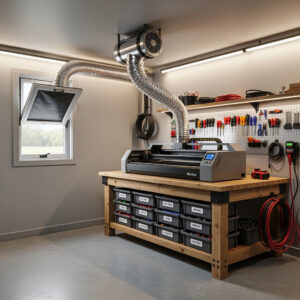
Inline fan selection: Centrifugal inline fans provide the static pressure necessary to overcome duct resistance in laser ventilation systems. Avoid axial fans (typical computer case fans) that lack pressure capability for ducted installations. Quality brands include Vortex, AC Infinity, and iPower, offering various CFM ratings and noise levels. Select 6-inch or 8-inch diameter fans depending on your machine’s exhaust port size and required CFM. Variable speed controls help balance noise versus ventilation performance.
Capture velocity requirements: Position exhaust inlets as close as possible to the laser focal point where fume generation occurs. Capture velocity (air speed at the inlet) should exceed the velocity of fume expansion to prevent escape into the workspace. For enclosed lasers, the exhaust port location determines capture effectiveness. For open diode lasers, position auxiliary suction near the work surface. Higher capture velocities require higher CFM or smaller inlet areas.
Exhaust Ducting and Routing
Moving captured fumes from your laser to the outside world requires ducting that maintains airflow efficiency while routing through your physical space constraints. Poor ducting design creates excessive static pressure, reducing effective ventilation and potentially creating backpressure that forces fumes into your workspace.
Duct sizing principles: Match duct diameter to your fan’s intake and your machine’s exhaust port. Common sizes are 4-inch, 6-inch, and 8-inch diameter. Undersized ducts restrict airflow, while oversized ducts add unnecessary cost and space requirements. Maintain consistent duct diameter throughout the run when possible. If transitions are necessary, use gradual expansions or contractions rather than abrupt changes that create turbulence.
Minimizing resistance: Every bend, fitting, and length of duct adds static pressure. Use smooth-walled metal ducting (aluminum or galvanized steel) rather than corrugated flexible duct that creates turbulence. Minimize bends and keep them gradual (45-degree preferable to 90-degree when possible). Support long horizontal runs to prevent sagging that creates low spots collecting debris. Calculate total equivalent duct length including fittings to verify your fan can overcome the resistance.
Routing options: Window exhaust installations use removable vent panels with duct connections that replace window screens temporarily. Wall penetrations require weatherproof exterior vents with backdraft dampers preventing outside air infiltration when fans are off. Roof penetrations suit permanent installations but require weather sealing and possibly professional installation. For buildings where external exhaust is impossible, recirculating filtration systems with activated carbon and HEPA filters clean air for indoor release, though these require regular filter replacement and maintenance.
Weather and pest protection: Exterior vents require louvers, screens, or backdraft dampers preventing rain, snow, insects, and small animals from entering ducts when fans are off. These protections add slight resistance but prevent serious problems from weather intrusion or nesting animals. Inspect exterior vents seasonally to ensure they remain clear and functional.
Air Assist Systems for Cut Quality
Compressed air directed at the laser focal point serves dual purposes: improving cut quality by removing debris and reducing char, and enhancing safety by suppressing flare-ups and reducing fire risk. Air assist transforms mediocre cutting results into professional-quality edges while providing safety benefits that justify the modest investment.
How air assist works: A narrow jet of compressed air (typically 10-30 PSI) blows across the material surface at the laser interaction point. This airflow removes vaporized material before it redeposits on the cut edge, cools the cut zone reducing thermal damage to surrounding material, reduces oxygen concentration at the cut point suppressing combustion, and prevents debris accumulation on the lens that would degrade beam quality. The result is cleaner cuts with less char, reduced flare-ups, and extended optical component life.
System components: Air assist requires an air compressor (small tankless units suffice for most hobby lasers), pressure regulator with gauge for adjustment, moisture trap or filter preventing water contamination of optics, tubing routing air to the laser head, and a nozzle directing air at the focal point. Oil-free compressors are essential, compressor oil in the air stream contaminates and eventually damages laser optics.
Pressure and flow optimization: Start with 15-20 PSI for most cutting applications. Higher pressures (25-30 PSI) benefit thick material cutting or materials prone to flaming. Lower pressures (5-10 PSI) suffice for delicate engraving where aggressive air flow might disturb lightweight materials. Adjust based on observed cut quality, higher pressure generally improves edge cleanliness but excessive pressure can cool materials below cutting temperature or disturb thin workpieces.
Nozzle positioning: The air assist nozzle must direct air precisely at the laser focal point. Most laser heads include threaded or push-fit nozzle mounts. Position nozzles 5-10mm from the material surface with the air stream intersecting the beam at the focal point. Adjustable nozzles allow optimization for different material thicknesses. Check nozzle alignment periodically as vibration can shift positioning.
When cuts exhibit excessive char or incomplete penetration, verify air assist operation as part of your diagnostic process. Inadequate air flow significantly degrades cut quality across all materials.
Material Storage and Handling
Efficient material handling reduces waste, accelerates job setup, and prevents damage to expensive stock. Organized storage systems keep materials clean, accessible, and properly supported to prevent warping or scratching that would compromise laser results.
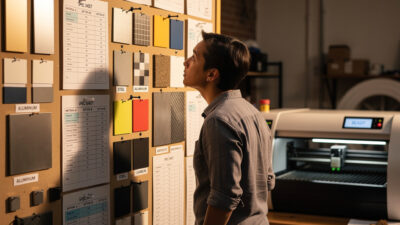
Sheet storage solutions: Store acrylic, wood, and other sheet materials vertically in racks preventing warping and enabling easy browsing. Horizontal stacking risks warping under weight and makes accessing specific sheets difficult. Vertical racks need appropriate depth to support sheets without tipping. Label storage locations with material types and thicknesses for quick inventory assessment. Climate-controlled storage prevents moisture absorption in wood and acrylic that causes warping.
Inventory management: Track material usage to maintain adequate stock without over-investing in inventory. Record sheet sizes, quantities, and suppliers. Note material-specific settings that work well for future reference. Organize remnants by size and material type for small projects rather than discarding them. Establish minimum stock levels triggering reorder to prevent production delays.
Material preparation stations: Dedicate space near the laser for material preparation including cleaning, masking tape application, and inspection. A nearby table or cart holds materials during job setup and receives finished pieces. This staging area should include cleaning supplies, measuring tools, and reference documentation. Efficient workflow minimizes material movement distance and reduces contamination risks.
Handling precautions: Handle acrylic with clean gloves or edges only to prevent fingerprints that engrave permanently into the material. Support wood sheets fully to prevent flexing that causes stress cracks. Store leather flat or rolled, never folded, to prevent permanent creases. Protect material surfaces from scratches that would appear in final products. Clean materials before lasering to remove oils, dust, or residues affecting results.
Honeycomb and Blade Bed Selection
The surface supporting your material during laser operation significantly affects result quality. Honeycomb beds provide support across the entire work area with minimal contact, while blade beds support material only at specific points. Each suits different applications, and understanding their characteristics helps you select appropriate support for your typical work.
Honeycomb bed advantages: Honeycomb aluminum or steel sheets distribute support evenly across material surfaces, preventing sagging in large or flexible pieces. The honeycomb structure allows airflow from air assist systems to penetrate beneath materials, improving cooling and debris removal. Honeycomb beds also permit vacuum hold-down systems that secure materials firmly without clamps or tape. They excel with thin, flexible, or large materials requiring distributed support.
Honeycomb maintenance: Debris accumulates in honeycomb cells over time, blocking airflow and potentially creating fire hazards if flammable buildup ignites. Clean honeycomb regularly by brushing, vacuuming, or removing and washing. Check for damaged cells that create uneven support or sharp edges that scratch material undersides. Replace honeycomb sheets when damage becomes extensive, as compromised beds affect result quality.
Blade bed characteristics: Blade or pin beds support material at discrete points, creating minimal contact area. This reduces backside marking from heat reflection and simplifies cleaning since debris falls between blades rather than accumulating in cells. Blade beds work well for rigid materials like thick acrylic or wood that do not require distributed support. They permit cutting completely through material without the blade interfering with the cut path.
Hybrid and custom approaches: Many operators use both bed types, selecting based on specific projects. Some create custom fixtures supporting irregular shapes or holding pieces at specific angles. Sacrificial layers of cardstock or thin plywood atop honeycomb beds prevent flashback burning on material undersides. Experiment with different support configurations to optimize results for your typical applications.
Electrical Requirements and Safety
Laser systems demand reliable electrical supply with appropriate capacity, grounding, and protection. Inadequate electrical infrastructure creates fire hazards, equipment damage, and intermittent operation problems that waste material and time.
Power capacity planning: Calculate total power requirements including the laser machine, exhaust fan, air compressor, water chiller (for CO2 systems), and any auxiliary equipment. CO2 lasers often require dedicated 15-amp or 20-amp circuits. Add 20-30 percent headroom to calculated loads for safety margins and future expansion. Avoid overloading circuits that trip breakers mid-job, ruining expensive materials.
Grounding and surge protection: Proper grounding protects against electrical shock and reduces electromagnetic interference affecting sensitive control electronics. Verify three-prong outlets with verified ground connections. Install surge protectors or uninterruptible power supplies (UPS) protecting control systems from voltage spikes and brief outages that could corrupt jobs or damage controllers. Never defeat grounding with cheater plugs or adapter devices.
Circuit labeling and organization: Label circuits clearly indicating which outlets serve laser equipment. Consider dedicated circuits for critical components. Organize power cables to prevent trip hazards and interference with moving machine parts. Use cable management systems keeping cords organized and protected from mechanical damage. Extension cords should be heavy-duty, properly rated for the loads, and temporary solutions rather than permanent installations.
Emergency power cutoff: Install easily accessible emergency stop buttons or power cutoff switches enabling rapid shutdown during emergencies. These should interrupt power to the laser, motion systems, and exhaust fans simultaneously. Test emergency stops periodically to verify function. Position them where you can reach them instantly from normal operating positions.
Workspace Organization and Ergonomics
An organized workshop accelerates work, reduces errors, and prevents injuries. Thoughtful layout considers workflow sequences, material movement, tool accessibility, and operator comfort during extended work sessions.
Workflow layout principles: Arrange your space following material flow: storage → preparation → laser operation → post-processing → finished goods storage. Minimize backtracking and crossing paths. Position the laser with adequate clearance on all sides for maintenance and material loading. Ensure the operator can see the work area clearly while maintaining safe distance from the beam path.
Ergonomics for extended work: Position controls and monitors at comfortable viewing heights preventing neck and eye strain. Set laser bed heights allowing comfortable material loading without excessive bending or reaching. Provide seating for long engraving jobs requiring monitoring. Ensure adequate lighting for visual inspection of setups and finished pieces. Comfortable operators produce better work and make fewer mistakes.
Safety equipment stations: Designate specific locations for safety glasses, fire extinguishers, first aid supplies, and emergency contact information. Post safety checklists and procedures visibly. Store hazardous materials (cleaning solvents, etc.) appropriately labeled and away from heat sources. Keep ventilation intakes clear of obstructions. These organizational habits reinforce safety consciousness during routine operations.
Tool and supply organization: Store frequently used tools (tweezers, picks, cleaning supplies) within easy reach of the laser. Organize less-used items in labeled storage. Maintain inventory of consumables (lens cleaning supplies, tape, etc.) to prevent work stoppages. A well-organized workspace reduces time spent searching for tools and prevents accidents from cluttered work surfaces.
Testing and Validating Your Setup
Before committing important projects to a new workshop setup, validate all systems through systematic testing. This verification process identifies problems while consequences remain minor rather than discovering issues during critical production runs.
Ventilation testing: Verify adequate airflow by observing smoke or vapor capture at the laser focal point during test cuts. Check that fumes do not escape into the workspace. Measure actual CFM at the machine exhaust port using an anemometer if possible. Listen for unusual fan noises indicating bearing problems. Confirm exterior vents function and weather protection operates.
Air assist verification: Confirm consistent air pressure at the nozzle using a gauge. Verify moisture traps prevent water from reaching optics. Check that airflow clears debris effectively during test cuts. Adjust pressure settings based on observed cut quality. Document optimal settings for your typical materials.
Electrical validation: Test emergency stops to verify immediate shutdown. Confirm circuit breakers handle normal loads without tripping. Check grounding with a tester. Verify surge protectors or UPS units function. Ensure all outlets and switches operate correctly without arcing or heating.
With your workshop properly configured, you possess the infrastructure foundation for safe, efficient laser operation. Apply these setup principles as you work through your first projects, refining the space based on experience. When problems inevitably arise, our troubleshooting guide helps diagnose whether workshop issues or machine settings cause difficulties.